Seats your team sits in


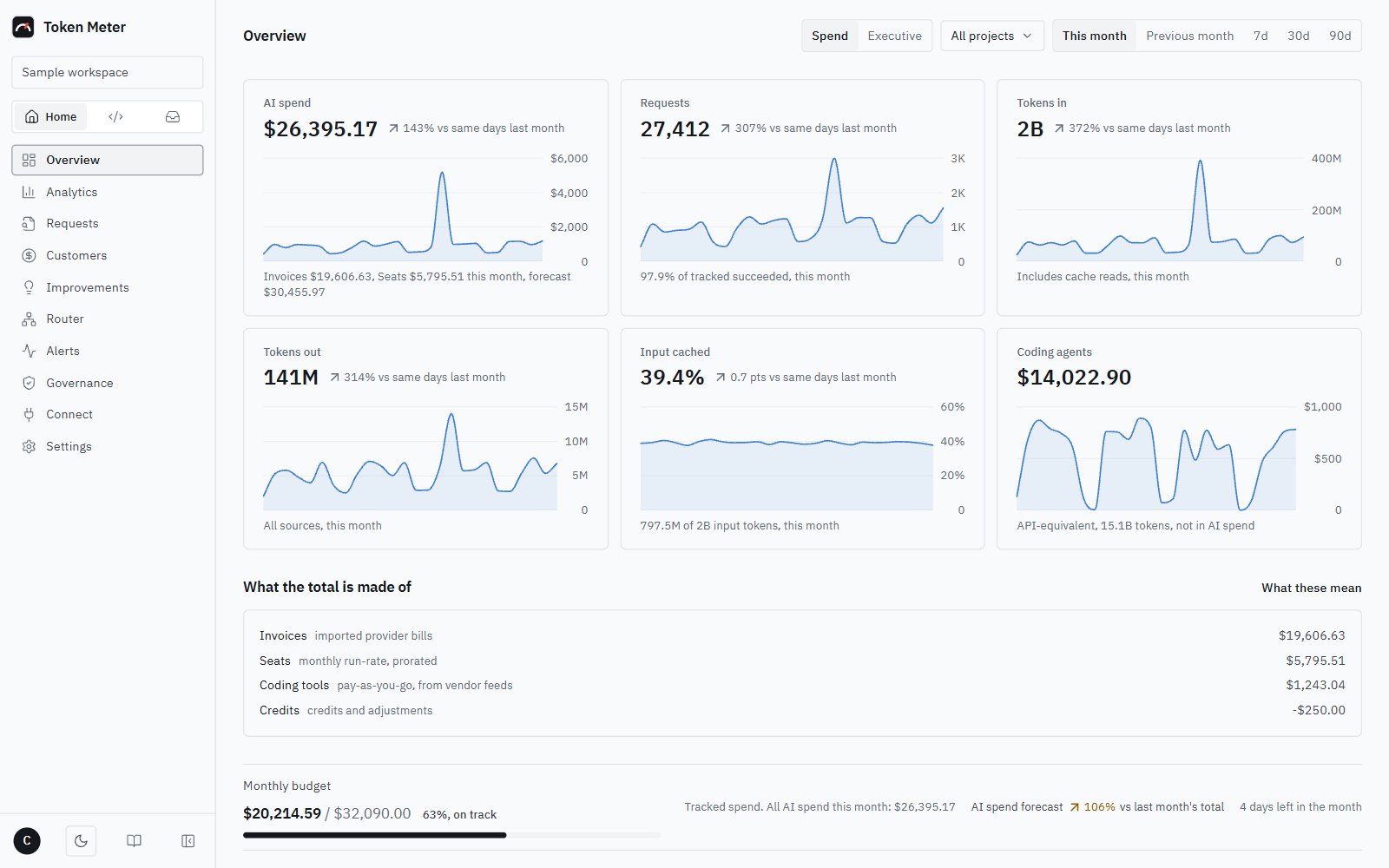
Claude Code, Cursor, Copilot and Codex, each billed its own way. Engineering has 21 seats, 2 dormant.
Two lines of code price every AI call and tag it to a customer and feature. Connect provider billing and every day is checked against the invoice, with any gap shown.
Free up to 1M events a month. No card. No proxy required.

Your calls still go straight to the provider, on your own keys. Token Meter reads the usage that comes back. Provider docs →
 OpenAI
 Anthropic
 Google Gemini
 Amazon Bedrock
 Azure OpenAI
 Vercel AI Gateway
 OpenRouter
 Mistral
 xAI
 Fireworks
 Together AI
 DeepInfra
Calls your product makes. Seats your team sits in. Invoices that land a month later. Here they are on one page, each counted once.
Claude Code, Cursor, Copilot and Codex, each billed its own way. Engineering has 21 seats, 2 dormant.
Each day of metered spend is set against what the provider billed.
It comes from two directions, and it has to add up.
Claude Code, Cursor, Codex and Copilot. By person, by repository, by pull request. Coding agents docs →
Follow one call from your app. It gets a price, an owner and a place in that customer's month. Customers docs →
req_7f3a91OpenAIgpt-4o1,204 in312 out$0.006130Connect provider billing once. Every day is checked against the invoice, and a gap over 2% is flagged.
Send your API calls through one endpoint. It picks a cheaper model where one is enough, uses a backup when a provider fails, and stops a call that breaks your rules before the provider sees it. Budgets warn you by email or Slack.
o1→gpt-4oTask typeRerouted.gpt-4o→gpt-4oAnswer reused from cacheCached.claude-sonnet-4-5→claude-sonnet-4-5Model was named in the requestAnswered.gpt-4o→claude-sonnet-4-5Backup model usedAnswered.One endpoint for your API calls, with fallbacks and caching. Each request shows the model you asked for, the model that answered and why. Router docs →
Free runs on your own provider keys, for the model you name. Paid plans add auto routing, with $25 a month of model spend included.Caching is off until you turn it on.
req_9c21e4team Stagingo1o1 is a blocked model in staging. OpenAI never saw the request.Rules. Allowed models, blocked models and a cost ceiling per request, set by team or environment. A routed call that breaks a rule stops before it reaches the provider.
Budgets and alerts. Paid plans
A monthly cap for the workspace, a team, a customer or an environment. Email or Slack when spend nears it. A workspace cap can also be enforced on routed calls.
Improvements. Savings found in your own usage and billing. Each one comes with a monthly figure and a confidence.
Provider usage, coding tool analytics, your repositories and your bills. Each one connected once, each counted once.
Provider usage Vendor analytics
 OpenTelemetryCloud billing
What your team's tools spend, what your customers cost, whether it matches the bill, and what to do about it.
TypeScript and Python. Usage ships in the background.
One action gives every call inside it the same customer and feature.
Change the base URL for routing, fallbacks and caching. On Free it runs on your own provider keys, for the model you name.
import OpenAI from "openai";
import { TokenMeterClient, wrapOpenAI, action } from "@tokenmeter/sdk";

const tl = new TokenMeterClient({ apiKey: process.env.TOKEN_METER_KEY! });
const openai = wrapOpenAI(new OpenAI(), tl);

await action("generate-report", { customerRef: "acme", feature: "reports" }, async () => {
  await openai.chat.completions.create({ model: "gpt-4o-mini", messages });
  // tagged customer_ref=acme, feature=reports
});
from openai import OpenAI
from tokenmeter import TokenMeterClient, wrap_openai, action

tl = TokenMeterClient(api_key=os.environ["TOKEN_METER_KEY"])
client = wrap_openai(OpenAI(), tl)

with action("generate-report", customer_ref="acme", feature="reports"):
    client.chat.completions.create(model="gpt-4o-mini", messages=messages)
# Point your OpenAI client at the router
OPENAI_BASE_URL=https://timewastevc.com/v1
OPENAI_API_KEY=$TOKEN_METER_KEY
No. The SDK wraps the client you already use, reads usage from the response it returns and ships it in the background. The router is a separate choice, for when you want routing, fallbacks and caching.
Not with the SDK: your keys stay in your app. For the invoice check you connect a billing source, such as a read-only provider admin key, AWS Cost Explorer, Azure Cost Management or a BigQuery billing export.
Every figure says where it came from. Metered cost is set against what the provider bills, day by day. A day that agrees is confirmed, a day beyond the tolerance is flagged, and anything inferred is marked Inferred until the invoice lands.
OpenAI, Anthropic, Google Gemini, Amazon Bedrock and Azure OpenAI directly, plus OpenRouter, xAI, Mistral, Fireworks, Together AI, DeepInfra and the Vercel AI Gateway through the OpenAI-compatible wrapper. Any other bill comes in by CSV.
Events, one per model call, and AI spend, their metered cost. Imported invoice lines and seat licences count toward neither. Settings, Billing shows where you stand. See pricing →
Yes. Coding tools report through their vendor analytics or OpenTelemetry. You get seats and usage per person, with coding tool spend beside your API spend.
They are demo data from a sample workspace, and the screens are captures of the app showing it. There are no invented customers, quotes or statistics on it.
A budget alerts by default, by email or Slack. A workspace cap can be enforced on calls sent through the router. Rules stop a routed call before it reaches the provider. Budgets and alerts are on paid plans.
Yes. Use the switch in the top bar. The app keeps your choice.